
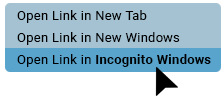
If the payment isn’t working, right-click the link below, open it in an incognito or InPrivate window, and try again:
https://talbotcpa.ca/online-payment
Secure Online Payment

Make sure you receive a ‘Payment Successful’ message after making the payment.
If your window/payment button freezes at ‘Pending approval’ or ‘Please Wait’:
– Delete the cookies in your browser and try making the payment again.
– Or try it on a different browser and see if the payment goes through.
If you have any questions about your statement and/or payments made, please EMAIL receivables@talbotcpa.ca
Other online payment options

Interac e-Transfer
Using your financial institution’s online banking portal, please ensure that you include the following information:
- Recipient: Talbot and Associates CPA
- Email: etransfer@talbotcpa.ca
- Message: include either your client number or invoice number (which can be found directly on your invoice).
Direct Deposit Information: Security question and answer are not required.
*PLEASE EMAIL receivables@talbotcpa.ca to let us know you sent your payment.

Credit Union
Step 1: Set Talbot & Associates as a Payee.
- Connect to your credit union website
- Select Transfers & Payments
- Select Manage Payees and click on Add Payees
- In the Search Payee name, type in talbot
- In the results, select Talbot & Associates
- In the Payee account number, enter your client ID number (printed at the top right corner of your invoice)
Step 2: Send Payment
- Connect to your credit union website
- Select Transfers & Payments
- Select Pay Bills
- Select Talbot & Associates as Payee
- Enter the amount of your invoice
- Pay bill
*PLEASE EMAIL receivables@talbotcpa.ca to let us know you sent your payment.